Owly Font Review: A Decorative Typeface for Campaign Impact
Picture this: You're finalizing the design of a YouTube thumbnail for a product launch. The visuals are on point, the color palette is cohesive, and the message is clear—except for one thing. The font you initially chose feels too generic, too safe. It doesn’t pop in the fast-scrolling feed. That’s when I decided to test Owly in the mix.
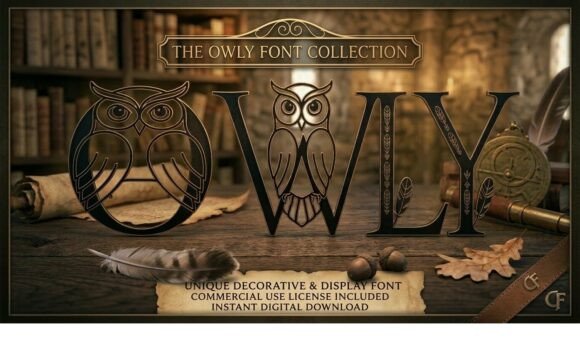
Owly is a decorative typeface that brings a touch of whimsy and nature-inspired elegance into digital campaigns. As a marketing designer who regularly works across platforms like Instagram, Pinterest, and email, I know how crucial it is to choose fonts that align with your brand's tone while standing out visually. Owly, with its intricate geometric details and classic typographic roots, adds just the right amount of charm without sacrificing professionalism.
Visual Style and Creative Appeal
The first thing that caught my eye about Owly was its organic yet structured feel. Each letterform seems to be handcrafted with attention to detail, almost as if it were inspired by the natural patterns found in bark or leaves. This blend of geometric illustration and traditional typography gives it a unique personality—mystical but approachable, vintage yet modern.
I used Owly in a seasonal sale announcement for an eco-friendly lifestyle brand. The font instantly elevated the visual appeal of the graphic, making the headline feel more artisanal and inviting. It wasn't over the top, but it definitely stood out compared to standard display fonts. The mood it set aligned perfectly with the brand’s story of harmony between nature and daily life.
Performance in Real Campaigns
When integrating Owly into campaign visuals, I noticed it performs best in short, impactful headlines. In a recent webinar banner design, using Owly for the title helped create a strong first impression. The geometric elements added depth and texture, making the callout stand out against a clean background.
For a series of Instagram posts promoting an online course, Owly was ideal for the teaser text. Its decorative flair made the content feel more curated and creative, which resonated well with the target audience of artists and designers. However, I had to be careful not to use it in longer descriptions where readability could suffer.
In Pinterest campaigns, Owly can add that extra layer of sophistication to editorial-style pins. When paired with high-quality images of botanicals or forest scenes, it created a cohesive theme that users scrolled past less often. That said, for image overlays with minimal white space, I opted for bolder weights and adjusted contrast to ensure legibility at smaller sizes.
Mobile Optimization and Readability
One of the biggest challenges in social media design is ensuring that your message remains clear on mobile devices. Owly shines here when used in larger sizes for thumbnails and headlines. For example, in a YouTube reel cover, the font was highly visible even at 100x150 pixels, thanks to its open apertures and distinct character shapes.
On dark backgrounds, Owly benefits from subtle outlining or increased stroke weight to prevent letters from blending in. Conversely, on light or pastel backdrops, the font maintains good clarity without additional styling. Always test it at various preview sizes before finalizing layouts, especially for digital ads where small formats are common.
Where Owly Thrives and Where It Falls Short
Owly is a display font through and through. It excels in headlines, logos, and branded titles but isn’t suited for long paragraphs or body text. In one instance, I tried using it in a landing page copy section, and the user experience suffered—readers lost interest quickly due to the lack of flow and consistency in line spacing.
That being said, Owly is perfect for creating campaign labels, quote graphics, and promotional banners where brevity is key. If you're launching a new product and need something memorable for your Instagram carousel, Owly can help craft a strong visual hierarchy with minimal effort.
Font Pairing and Brand Consistency
To maintain brand consistency while leveraging Owly’s creativity, I recommend pairing it with a clean sans serif or a minimalist serif font. For example, when designing a product teaser for a wellness brand, I combined Owly with a simple Helvetica Neue for supporting text. This contrast gave the campaign a balanced look—playful yet professional.
Another effective pairing was with a handwritten script font for a blog post header. Owly provided the structure, while the script added a personal touch. This combo worked particularly well for a content series focused on mindfulness and nature, reinforcing the brand's aesthetic across multiple platforms.
Always consider the context and purpose of each piece. If you’re aiming for a bold, artistic statement, go ahead and use Owly alone. But for multi-platform campaigns that require a unified typographic system, it’s better to treat it as an accent rather than the main voice.
Practical Tips for Using Owly in Campaigns
- Check included styles: Owly comes with a range of alternates and ligatures that allow for customization. These variations can help differentiate your campaign assets while keeping them consistent under one typographic umbrella.
- Confirm file formats: Make sure the font files you receive support web-safe formats like WOFF and TTF, so they render smoothly across all platforms and devices.
- Verify multilingual support: If your campaign targets international audiences, confirm that Owly supports the necessary languages and special characters.
- Review commercial licensing: Like any premium font, Owly requires proper licensing for use in client campaigns, merchandise, or digital products. Always double-check the terms before going live.
Real-World Applications and Limitations
I’ve tested Owly in several scenarios, including an online shop promotion for a handmade jewelry brand. The font worked wonders for the hero headline, but I switched to a simpler typeface for the product descriptions and pricing. This ensured the information remained scannable and accessible, while still benefiting from Owly’s presence in the branding elements.
In another case, I built a set of email banners for a digital art school. Owly was used for the subject lines and headers, which boosted engagement due to their visual uniqueness. However, in the body of the email where links and bullet points were needed, it became impractical. The lesson? Reserve Owly for decorative titles and avoid using it for dense or functional content.
If you're working on a campaign that needs to feel formal or corporate, Owly might not be the best fit. Its playful nature clashes with overly serious messaging. That said, for lifestyle brands, creative agencies, and niche markets targeting a younger or more artistic demographic, Owly is a powerful asset.
Design Assets and Workflow Integration
Owly integrates seamlessly into most design tools, including Adobe Photoshop, Illustrator, and Figma. The file size is manageable, and the rendering quality stays consistent across both print and digital outputs. I've also used it in website banners and seen no issues with cross-browser compatibility, as long as the font is embedded properly using CSS or Google Fonts.
As part of a branded template pack, Owly helped unify a collection of social media assets for a sustainable fashion brand. From YouTube thumbnails to Instagram Stories, the font brought a sense of cohesion and identity that the team hadn’t achieved before. They now use Owly as a signature element in their visual storytelling.
Final Takeaway for Marketers and Designers
Owly is not just another decorative font—it's a strategic choice for campaigns that need a touch of magic. Whether you're crafting a product teaser, a YouTube thumbnail, or a Pinterest pin, Owly helps elevate your message with style and substance.
Use it wisely. Prioritize readability, especially in mobile-first designs. Pair it with complementary fonts to maintain balance and clarity. And always verify licensing and technical specs before deploying it across platforms.
If you're looking for a premium display font that communicates creativity and connection to nature, Owly is worth considering. Just remember—like any great tool in your design arsenal, it’s most effective when used intentionally and sparingly.